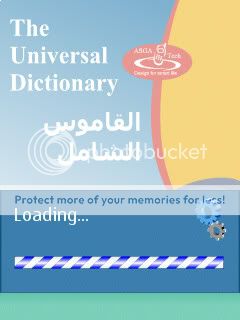
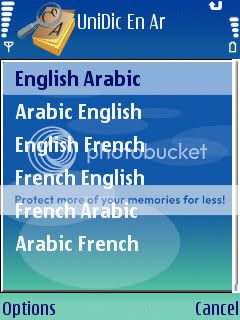
The Comprehensive dictionary containing More than 28,000 words and their translations offered in 2 dictionaries, covering 2 basic languages; Arabic and French
Main feature
1.Very nice and comfortable user interface.
2. Rich dictionary, it contains more than 28,000 Words and their translation.
3. dictionaries with the ability to choose between them (Arabic < > French)
4. Easy seeking for a specific word by using up and down arrows or by writing it.
5. Display the word and all its translations.
6. Copy single words, selected paragraphs or whole word definitions in external programs on your phone
7. Virtual keyboard to simulate the phone keyboard.
Compatibility
N96 - N95 8GB - N95 - N93i - N93 - N86 8MP - N85 - N82 - N81 8GB - N81 - N79 - N78 - N77 - N76 - N75 - N73 Special Edition - N73 Music Edition - N73 - N71 - E90 Communicator - E66 - E65 - E63 - E62 - E61i - E61 - E55 - E52 - E51 - E50 - 6730 classic - 6720 classic - 6710 Navigator - 6650 - 6290 - 6220 Classic - 6210 Navigator - 6124 Classic - 6121 Classic - 6120 Classic - 6110 Navigator - 5700 Xpress Music - 5630 XpressMusic - 5320 Xpress Music - SGH-L870 - SGH-i550 - SGH-i450 - SGH-G810 - i8510 INNOV8 - LG KS10 X6 -


Read more...


Joikusoft JoikuBoost Beta v0.10.24 S60v3 S60v5 SymbianOS9.x
JoikuBoost multiplies your mobile internet Speed. JoikuBoost joins multiple 3G connections from mobile phones and operator networks into one larger unified and shared bit pipe, accessible over WiFi from e.g. laptops.You can create your personal 4G WiFi Network over 3G today, and boost your mobile internet experience into a totally new level. You can add multiple Boosters to your WiFi hub and add to your overall mobile internet capacity and network connection speed.JoikuBoost bases on an entirely new 3G internet communications protocol developed by Joikusoft.
JoikuBoost is unique in the world, and Beta version is released to gain Joiku-user feedback on UI, feature and functionality wishes, common use cases for the solution and beta stage performance and bug reports


Read more...


Voyager Home Screen v3.0.2 Unsigned [Official English Test version]

Voyager Home Screen(vHome) is a FREE ware helps you customize your S60's home screen with big clock, start menu, weather, news ticker,Google,fav contact,smart dialing ,etc.
download the sis(unsign)
http://vhomev3en.googlecode.com/file...02a_unsign.sis
This is what looks like after you install.
This is what looks like after you select city and news channel, enable 2 rows shortcuts.
Features like Google, weather, news , Operator logo, big clock are pretty straight forward, if you do not like a certain feature, just press C to disable it.press left/right on to-do bar and news bar could switch item.
Quick task switch: we use the red end key to switch between running tasks,it's lot easier than pressing home key and then select, also you will never quit java apps like Opera Mini/Gmail by accidentally pressing red key.
Smart dialing: just type one number for one letter , to find any contact fast.Like 2455 for Bill. You can use this for apps,too. Like 46245 for Gmail. You might find phone's menu a bit useless when you can get to anything from home screen with smart dialing.
Start menu : another way to organize your apps, you can locate an app using smart dialing, and place the app in start menu or home screen shortcut easily. And we support sub-folder in start menu.
MyFav: we scan your call logs automatically. and place the people you call/text most frequently in MyFav feature, on the home screen's right selection key.(of course you can change this with any app you want).press left/right key in this, you can see your most used apps,too.
vApps: yeah, we include a mini app store , the seventh shortcut. not too many apps for now(tell us what you want to see here), we want to gather the best free apps here, all fit your phone model(we test and organize them by screen resolution, mr/fp1/fp2 etc, so you don't have to).just one click to download, auto install to E: , dead simple.(the list is updated automatically , so check in once in a while).
New app popup: after a new app is installed, you would see a popup asking if you would like to run it now. save you time digging in to menu to find it.
Web directory: Click web browser, you'll see our directory page. all most popular mobile sites(hopefully). If you don't like it, just turn it off in Start-Settings-More
Keypad Lock: the system's settings would not work, please setup again in vHome.Lock is easy: Start-Lock, much better than old way. Press end key twice to unlock.
Connection: by default,vHome update weather/news each hour, 9:00-23:00 (no update if you disable news and weather), change this in Start-Settings-Connection to suit your needs.
We do not have a web site yet, come to http://groups.google.com/group/voyager_mobile if you want to give us feedback(We'll appreciate it) or email steven.wireless@gmail.com
vHome works with most S60 (including 320*240 models like E71, but not 3250,N91,5500)
For E series,you may find holding home button would not work, install a task manager soft like Jbak will solve this.
vHome does not replace original home screen, we just place another layer on top of it, so when you quit Menu, you would see the screen splash to 'old' home screen first, also when calling. We'll work on this in the future.
About power consumption , we did many tests using Nokia Energy Profiler, vHome does not consume more power, except when downloading weather/news data.
With big clock turned on, you may find wall paper do not display properly with some themes, we're working on this.


Read more...


WebGate Advanced Device Locks v1.10.151 S60v3 SymbianOS9.1
Do you need to protect important information and personal data that you have stored in your phone? Do you need to restrict the access to certain applications?
Do you need to stay confident that your phone applications will not be accessible even if the mobile phone is stolen?
If you need all this, you obviously need Advanced Device Locks.
Advanced Device Locks is a Symbian OS application for locking the phone or selected applications only, such as Messages, Pictures, Contacts, Video or any other. With Advanced Device Locks you can secure your phone by locking it up with a secret code up to 7 characters long.
Advanced Device Locks allows you to lock your phone automatically by choosing one of the following options:
Always - each time the phone is turned on, it asks for the unlock code.
When SIM Changed - the locks are on if the SIM card of the phone is changed.
Automatic lock - an automatic lock is switched on after a specified period of inactivity in minutes.
Protected applications - this option turns on the device locks if someone tries to access the protected applications.
With Advanced Device Locks you have the unique option to choose whether to lock the phone itself, to lock selected applications on it or to combine these two options and lock both the phone and certain applications.
The lock code can be changed very easily only with a few clicks.
Default Lock Code:
The application asks for a default lock code which is 0000. You are strongly recommended to change it with a new code of your own. You can do this from the "Code" menu. Please type the default code in the "Old code" field.


Read more...


What can ADL Pro do for you?
ADL Pro protects important information and personal data on your phone. With ADL Pro you can restrict access to certain applications, protect sensitive information and delete it remotely in case your phone is lost or stolen.
With ADL Pro you can rest assured that if your phone is lost or stolen, you will be notified of any unauthorized attempt to use it and trace it back. You can lock the phone remotely, switch on an alarm or delete your personal information by simply sending a text message with a predefined keyword.
Application and Phone Locks
ADL Pro allows you to lock your phone automatically by choosing one of the following options:
* Always - each time the phone is turned on.
* When SIM Changed - the locks are on if the SIM card of the phone is changed.
* Automatic lock - an Automatic lock is switched on after a specified period of inactivity.
* Protect applications - this option turns on the device locks if someone tries to access the protected applications.
Secure Storage
ADL Pro comes with a password-protected secure storage where you can place your confidential files. Files can be recovered easily by entering a password. You can use the secure storage as a safe deposit box for all your confidential documents, pictures and/or audio/video Files.
SMS on SIM changed
ADL Pro alerts you if the SIM card on your phone has been changed by sending a notification SMS to a predefined number. The IMSI number of the new SIM card will be secretly sent to your backup number without the notion of the unauthorized user and your mobile operator and local authorities can assist you to track the new user, and trace the phone.
For backup number you can use the number of your backup phone or the number of your secretary, spouse, colleague or friend. If you have more than one SIM card and you wish to authorize them to use with your phone, you can do that by simply entering your pass-code once and the SIM card/s will be remembered for further usage.
Remote Lock and Data Wipe
Remote Lock is a combination of settings designed to protect the phone from theft and abuse. You can pre-select actions for ADL Pro in case an SMS with the keyword is received.
Available options are:
* Lock the phone
* Switch on an alarm
* Delete selected data
By choosing the Delete option, you can remotely delete sensitive information from your phone, such as Contacts, SMS, Gallery, Calendar and Secure Storage to protect it from unauthorized usage. If this option is selected and remotely activated, your phone will send you an SMS with a confirmation request to prevent from accidental mistakes.
ver. 2.03
* Full support for Samsung and Sony Ericsson S60 5th edition devices


Read more...


NFL 2010 Mobile Java Game


Read more...


Pro Evolution Soccer 2010 Mobile Java Game


Read more...
Next Page » « Previous Page